November 2026 updateThis post is from October 2010 and shows the old WordPress editor, so the Publish widget and Visibility link in the steps below have moved. In today’s block editor, the setting is a Sticky check box in the post settings sidebar, and a sticky post still sits at the top of the front page of your posts. The current steps are at the end of this post.
How do I make a particular WordPress post stick to the homepage of my blog? A sticky in WordPress? This is a common question that my friends who have just started using WP to blog ask me. So we’ll describe the procedure for doing this in a bit.
Why would I want to create a sticky?
If you have useful content on your blog or website that people read frequently. Or if you have content that you want people to read, making that particular post stick to the homepage is a great way to do it.
Where will it appear on my homepage?
If you configured your blog’s homepage to display multiple posts, the post that you made into a sticky will appear at the top of the page. Your sticky post will remain at the top of the page even if you publish new posts.
Follow these steps to make a post stick to your WordPress home page.
- Log on to your WordPress blog.
- Create a new post by clicking Posts > Add New.
- Fill out the post title, content, and other fields that you want to configure.
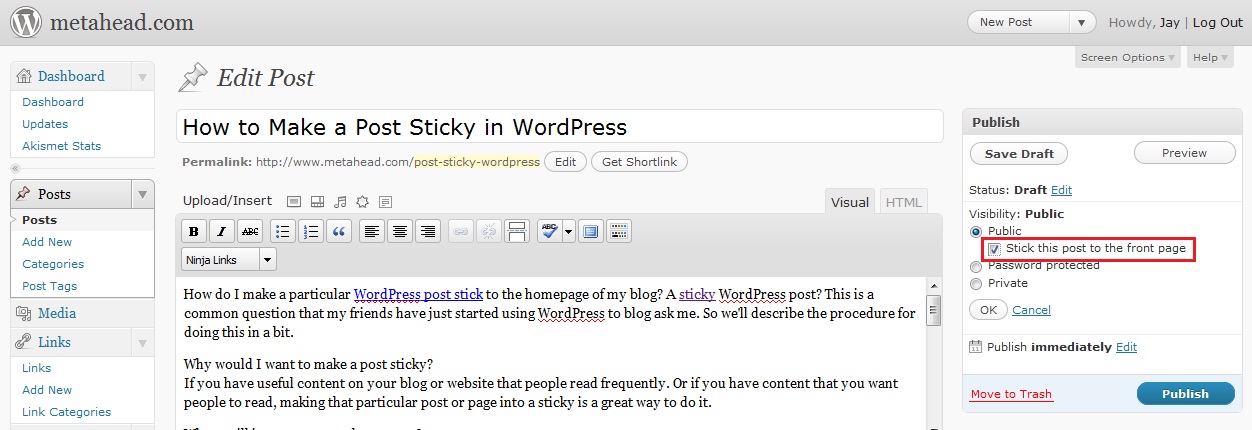
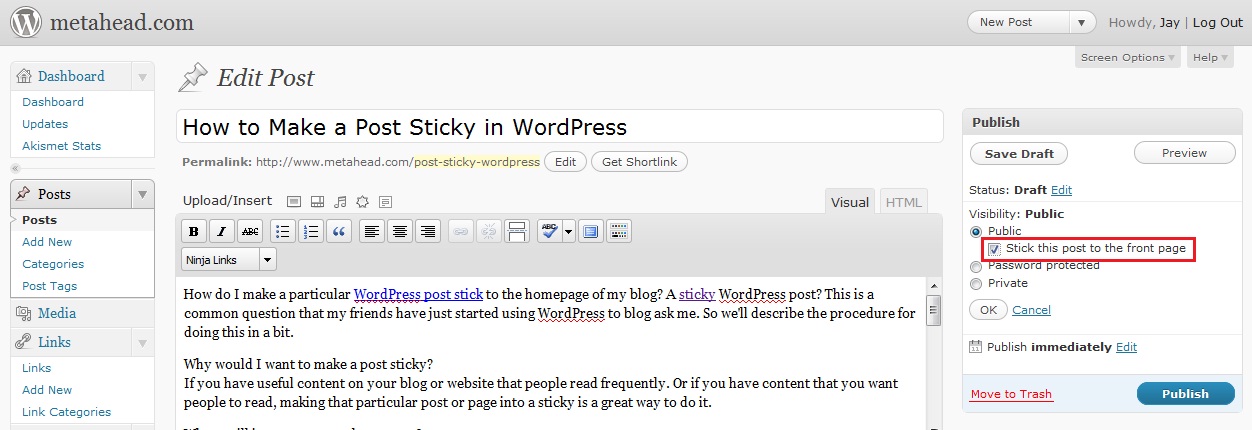
- When you are ready to publish the post, look for the Publish widget.
- In Visibility, click the Edit link.
- Select the Stick this post to the front page check box.
- Click Publish.
- Go to your blog’s homepage and verify that the WP post that you stickied appears as the first article.
You’re done! That was easy, right?
Visit my WordPress archives for more tips and tricks on using WP. If you also have WP tips and tricks that have not been covered (or covered completely), I invite you to submit a guest post. If you think you have something useful to share, send it in!
How to make a WordPress post sticky in 2026
- Open the post in the WordPress editor.
- In the upper-right corner, select the gear icon to open the settings sidebar, and make sure the Post tab is selected.
- In the Status section, select the Sticky check box.
- Publish or save the post.