November 2026 updateThis post is from March 2010 and covers an early version of Thesis, where the footer lived in footer.php. In newer versions of Thesis that use the Flex skin, DIYthemes says you change the footer text from the dashboard, under Thesis, Skin Content, Copyright & Attribution (Flex). If you edit any theme’s files directly, keep in mind that a theme update replaces the entire theme, so any changes you make to any specific files will be lost, which is why WordPress recommends a child theme for code changes.
If you are using WordPress for your blog like the rest of the world (except for my grandmother who doesn’t blog), you may have already heard of the Thesis theme. In my opinion, it’s one of the most customizable and flexible themes ever built. It includes a lot of design, search engine optimization, presentation, and content options for your blog, which is why I decided to purchase it. Yes, it’s a paid WordPress theme, so you will have to shell out some cash to take advantage of the power it can add to your WordPress blog. I will do another post on why I think it’s a killer theme, but for now, we’ll focus on one of the things that you’ll probably want to customize after you buy the theme.
I’ve started customizing my Thesis installation — to make it more different from the default theme that I got when I purchased the theme. One of the first things that I wanted to do was to change the footer to link to metahead.com, instead of to diythemes.com.
Here’s how I did it (and this is very possibly the simplest way to do it).
What you will need
- A text or HTML editor (I use Adobe Dreamweaver)
How to edit the footer
- Using a text or HTML editor, open
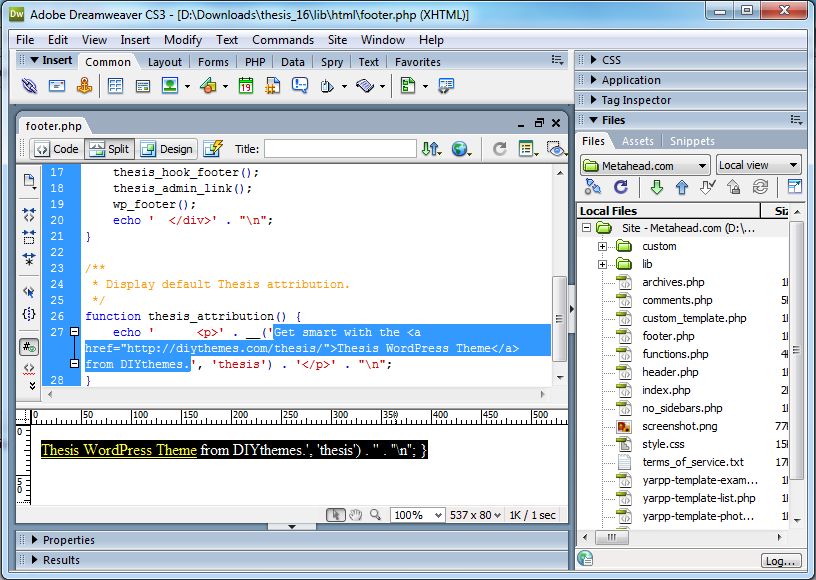
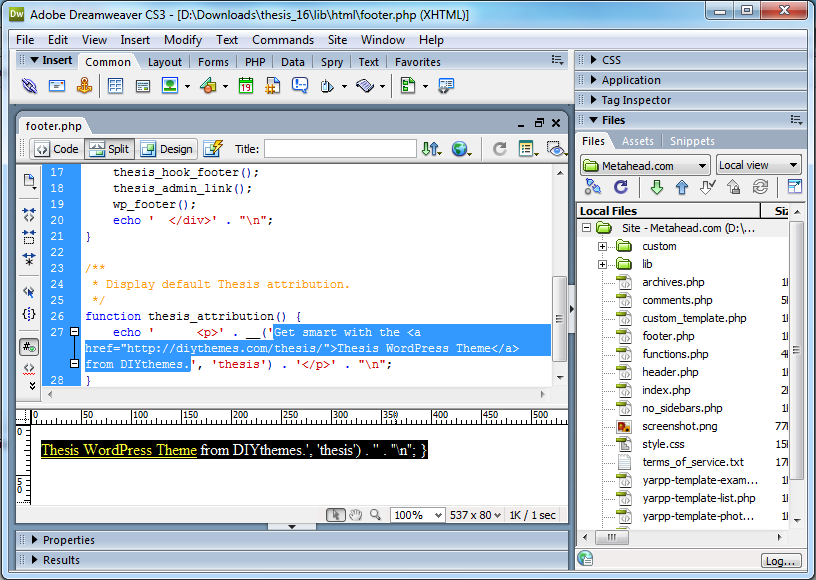
footer.phpthat is located in thelibhtmlfolder of the theme. - Make sure you view the source code.
- Edit the following text:
Get smart with the <a href="http://diythemes.com/thesis/">Thesis WordPress Theme</a> from DIYthemes.to change it to your own footer. I changed the footer for metahead.com to:Copyright © 2010 Metahead.com <a href="http://www.metahead.com/">Make Money Online</a>.
See the highlighted text in the screen shot at the end of the post. - Save
footer.php. - Upload
footer.phpto your Web host.
You have completed editing the footer of the Thesis theme for WordPress. Now go visit your site and check your new footer!