
A domain name owner lookup used to be easy. You typed the domain into a WHOIS tool and got a name, an email address, and often a phone number. For most domains now, you get the registrar, a few dates, a country, and a line that says the rest is redacted. You can’t see who owns most domains anymore, but you can usually still reach them.
Here’s what a lookup shows today, how each of the big registrars passes your message along, and what to do when the official route goes nowhere.
Why the owner’s details are hidden
Privacy laws started the change in 2018, and ICANN’s Registration Data Policy made it the norm. Since 21 August 2025, that policy has let registrars publish a pseudonymized email address or a link to a web form instead of the owner’s real email address. Big registrars such as GoDaddy, Namecheap, and Porkbun also add their own free privacy service on top, so the name, address, and phone number in the record belong to a privacy company, not the owner.
The tool has changed, too. WHOIS has been replaced by RDAP, a newer protocol that returns the same kind of data in a structured format. Since 28 January 2025, registries and registrars for generic domains like .net and .org no longer have to run a WHOIS service at all (.com, .name, and .post are the exceptions), though they must provide RDAP. For a quick check, ICANN’s free Lookup tool at lookup.icann.org queries RDAP for you. It also tells you which registrar the domain is at, which matters for the next step.
What a lookup can still tell you
Don’t skip past a redacted record. Even with the owner hidden, it usually shows four useful things:
- The registrar. This tells you which contact form or relay address to use.
- The country, and often the state or province. Cloudflare, for example, keeps both visible because ICANN policy requires it.
- A company name, sometimes. Under ICANN policy, a name in the Organization field becomes the registered name holder. Some registrars publish it, so a company-owned domain may tell you exactly who owns it. At GoDaddy, the owner’s “Limited” privacy setting shows the Registrant Organization, state or province, and country.
- The contact method. Look at the Registrant Email field. Instead of an address, it often holds a link to the registrar’s contact form, or a relay address that forwards to the owner.
How each registrar passes your message on
Every ICANN-accredited registrar has to give you some way to reach the owner, but they don’t all work the same way. The differences matter: some let you write a real message, and some don’t. There’s also no single form that covers every domain. Each registrar runs its own, so use the lookup to find the registrar, then go to that registrar’s page below. Where a link includes [domain], put in the domain you’re asking about.
| Registrar | What the lookup shows | How to reach the owner |
|---|---|---|
| GoDaddy | Domains By Proxy details, added by default | Search the domain at whois.godaddy.com, then click Contact Domain Holder at the bottom of the results. You pick one of three set reasons and can’t write a message. The owner gets your email address. |
| Dynadot | Dynadot’s details in place of the owner’s; full privacy is the default | Search the domain at dynadot.com/domain/whois, then use the Contact Domain Holder link at the bottom. Like GoDaddy’s form, it has no free-text field. |
| Namecheap | Withheld for Privacy details | No form. Look the domain up at namecheap.com/domains/whois and email the relay address in the record. It forwards to the owner, so you can write a normal email. |
| Porkbun | Private by Design details | A form at porkbun.com/whois/contact/registrant/[domain], also linked next to “email” in Porkbun’s WHOIS. You verify your own email first, then write your message. The owner sees your email address. |
| Cloudflare | “Data Redacted,” plus state and country | A form at domaincontact.registrar.cloudflare.com/[domain] that forwards your message to the owner’s email |
| .ca domains (CIRA) | For individuals, no name or contact details | Look the domain up at whois.cira.ca and use CIRA’s Electronic Message Delivery Form, which forwards your message to the owner’s administrative contact email |
None of these routes guarantees an answer. CIRA says plainly that it can’t guarantee the message will be received, read, or replied to, and no registrar can make an owner write back.
What a GoDaddy owner actually receives
GoDaddy manages more .com domains than any other registrar, so buyers run into this form often, and it’s the most limited. When you click Contact Domain Holder at the bottom of GoDaddy’s WHOIS results, you choose one of three reasons: the domain is being used for malware, spam, or abuse; it’s infringing a trademark or breaking local laws; or “research or other purpose.” There’s no box for your own message.
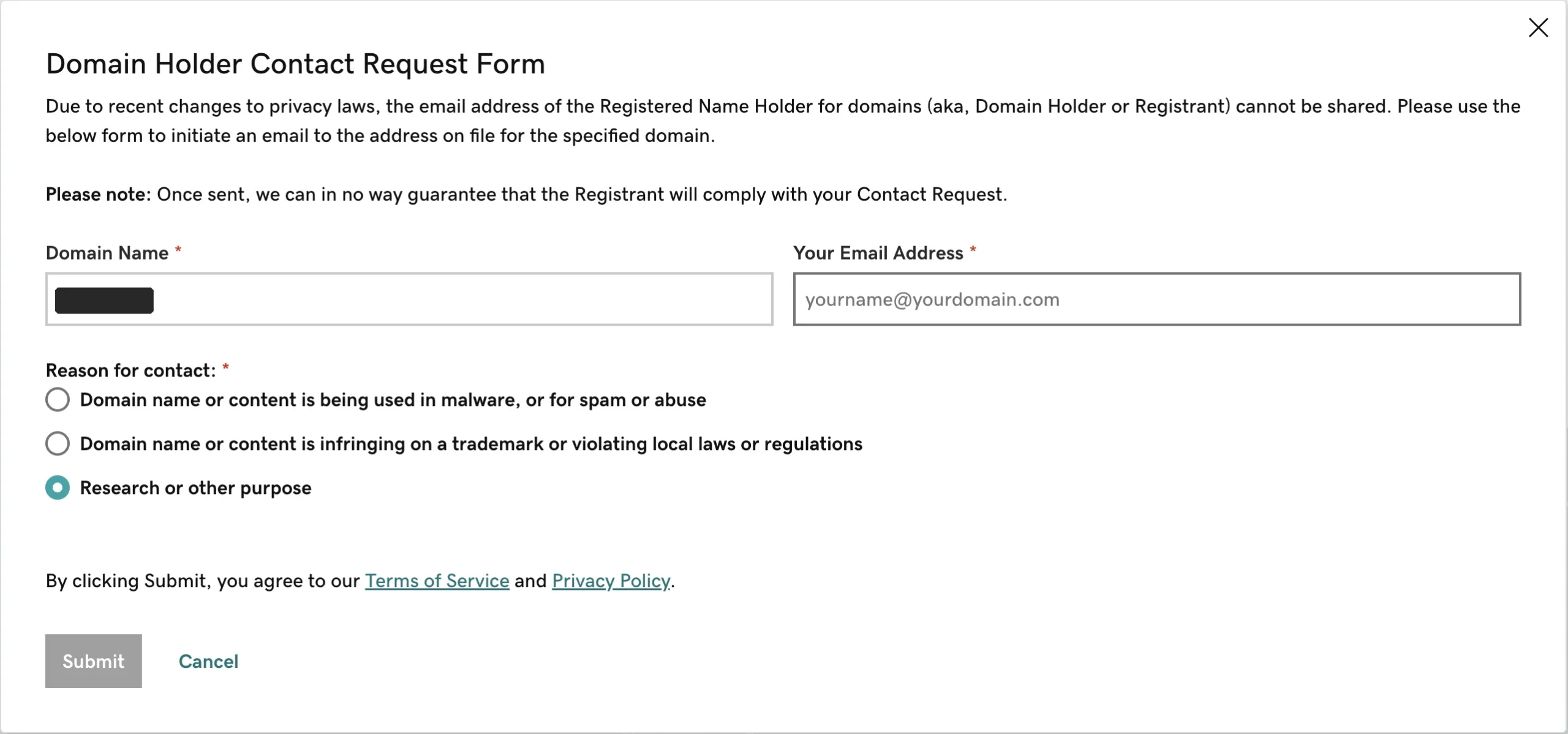
None of the three options says you’re interested in buying the domain. If that’s why you’re writing, pick “Research or other purpose.” The owner then gets the same email I got, shown below.
I own domains at GoDaddy, so I get these. Here’s one that arrived this week, with the domain blacked out:
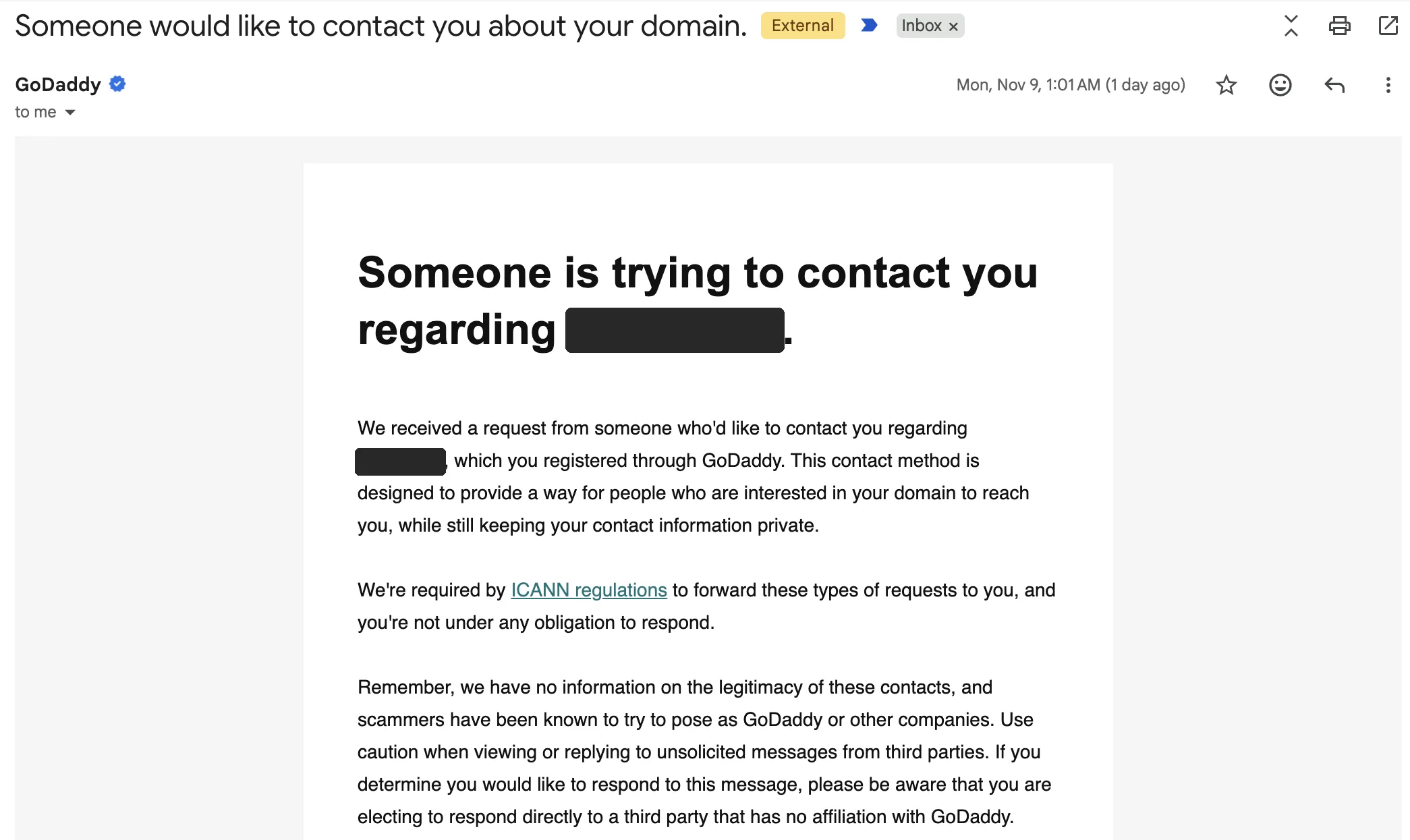
Further down, the email gives the requester’s address and the entire message, which is a stock line, not anything the requester wrote:
Here is the message from [requester’s email]. Once again, this is NOT from a GoDaddy representative. GoDaddy does not authorize or verify any offers to sell or purchase domains via email.
I would like to contact you regarding your domain and/or content on your website.
The first time I received this type of message, I thought it was spam. The line is so generic it reads like the bulk messages spammers send. It wasn’t. GoDaddy doesn’t let the sender type a message; they can only choose from a few prewritten options. So a real buyer’s inquiry looks just as generic as spam, and I suspect plenty of owners delete them.
That’s all the owner learns about you: an email address and a generic sentence. No name, no offer, no reason to reply. The email also reminds the owner that GoDaddy has no information on the legitimacy of these contacts, and that scammers pose as GoDaddy. Then it tells them that if they want to sell, the safest course is to list the domain for sale and email you that it’s listed.
Some people in the industry think this goes too far. In May 2026, ICANN published an advisory describing a form like GoDaddy’s, without naming the registrar, and said it doesn’t break the rules: the policy requires a way to facilitate email communication, but it doesn’t require a free-text option or forwarding. The form doesn’t verify the sender’s email address either, so an owner has no way of knowing whether the address really belongs to the person who sent the request.
If you’re the buyer, this changes how you should use the form. The only thing you control is the email address, so use one that says who you are, ideally on your own company’s domain rather than a free webmail account. Then expect silence, and keep looking for a better route.
Other ways to reach the owner
The registrar’s form is the official route, not the only one. Before you use it, or after it goes nowhere, check these:
- The website itself. If the domain has a live site, the owner has often said who they are somewhere: a contact page, the footer, an About page, or a privacy policy or terms page that names a legal entity.
- A “for sale” page or marketplace listing. If the domain shows a for-sale landing page, or is listed on a marketplace such as Afternic or Sedo, use that. It’s the route the owner chose, and it’s the one GoDaddy itself steers owners toward.
- Historical WHOIS records. Some services keep old snapshots of WHOIS records. If the domain was ever registered without privacy, an older snapshot may still show the owner. Records from before 2018 are the most likely to have full details.
- The company behind it. If the record or the site names a company, approach the company directly, through its normal contact channels.
- A broker. If none of that works and you really want the name, a domain broker can make the approach for you. I’ll cover when that’s worth paying for in a separate post.
What about formal disclosure requests?
There are official ways to ask for an owner’s hidden details, but they aren’t built for domain buyers. ICANN’s Registration Data Request Service is a path for consumer protection advocates, cybersecurity specialists, government officials, intellectual property professionals, law enforcement, and others with a legitimate interest.
Participation is voluntary for registrars, and, in late 2025, ICANN’s board extended it for up to two more years while the longer-term system is debated. GoDaddy has its own process: you download a disclosure request form, send it with supporting documents to [email protected], and GoDaddy responds within 30 days. For .ca, CIRA only considers disclosure when the requester has a current, good-faith dispute with the registrant and sent a message about it through CIRA’s form at least 14 days earlier, among other conditions.
Wanting to buy a domain isn’t a dispute, so these routes aren’t for you. Use the registrar’s form, look for a listing or a site contact, and accept that some owners simply won’t answer.
If you’re on the other side, and you own names you’d sell, the lesson is the same one GoDaddy’s email gives: don’t rely on the contact form to bring you buyers. List the names somewhere a buyer can make an offer.
Top photo: Daria Nepriakhina / Wikimedia Commons (CC0).
Sources
- ICANN: Advisory announcement (May 2026), Advisory: registrars’ use of web forms in RDDS, RDAP FAQs, Registration Data Request Service, RDRS extended, ICANN Lookup
- GoDaddy: What is Domain Protection?, What is Domain Privacy?, Request for Disclosure of Non-Public Registrant Data, Privacy FAQ
- Registrars: Namecheap: The state of Whois, Domain privacy, ICANN policy for the Organization field, Porkbun: What is WHOIS?, Porkbun: contacting a registrant, Cloudflare: WHOIS redaction, Dynadot: domain privacy, Dynadot: contacting a domain holder
- CIRA: .CA WHOIS, What is WHOIS?, Request for Disclosure rules
- Industry coverage: Domain Name Wire: ICANN says GoDaddy’s contact form is OK, Top registrars, Domain Incite, Dreyfus on RDRS, Name.com, Instant Domain Search
- The GoDaddy email shown above was received by the author in November 2026.